Joins reference
Connect models to each other so people can query more than one table at a time
Performance Best Practice: For optimal query performance, we recommend using wide tables wherever possible and minimising joins in the BI layer. While we offer advanced features like fanout protection to help with complex relationships, handling data transformations and complex logic directly in your SQL models will generally yield better performance than relying heavily on joins at query time. Consider pre-joining related data during your data modeling process rather than joining tables on-the-fly in dashboards and reports.
Adding joins in your models
Joins are defined at the same level as the model parameters in your YAML file.
models:
  - name: accounts
    config:
      meta:
        primary_key: id
        joins:
          - join: deals
            type: left
            sql_on: ${accounts.id} = ${deals.account_id}
            fields: [unique_deals, new_deals, won_deals, lost_deals, stage]
relationship: one-to-manymodels:
- name: accounts
meta:
primary_key: id
joins:
- join: deals
type: left
sql_on: ${accounts.id} = ${deals.account_id}
fields: [unique_deals, new_deals, won_deals, lost_deals, stage]
relationship: one-to-manytype: model
name: accounts
primary_key: id
joins:
- join: deals
type: left
sql_on: ${accounts.id} = ${deals.account_id}
fields: [unique_deals, new_deals, won_deals, lost_deals, stage]
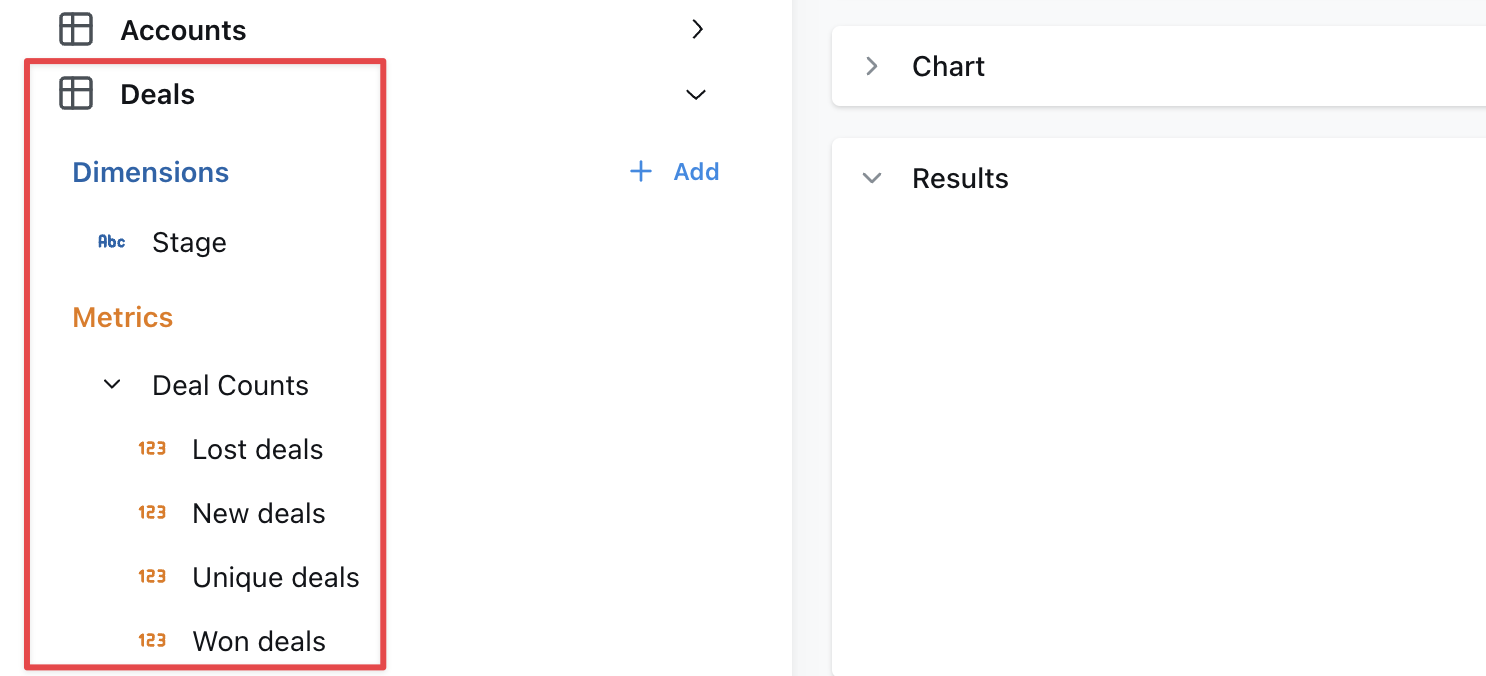
relationship: one-to-manyWhen you open Qyra, the dimensions and metrics from your joined model will appear below the ones in your selected model.
- Omit
fieldsto include all metrics and dimensions defined in the joined table. - When joined fields reference other fields, those other fields must be included.
- The
sql_onstatement can include references to user attributes for row-level filtering.
Rename a joined model
When joining tables, you may want to rename for readability. This can be done with the label tag, for example on the messages model it makes sense to rename the joined users table as "Sender":
models:
  - name: messages
    config:
      meta:
        joins:
          - join: users
            label: Sender
sql_on: ${messages.sent_by} = ${users.user_id}models:
- name: messages
meta:
joins:
- join: users
label: Sender
sql_on: ${messages.sent_by} = ${users.user_id}type: model
name: messages
joins:
- join: users
label: Sender
sql_on: ${messages.sent_by} = ${users.user_id}You can also override the description of the joined table by providing a description field:
models:
  - name: messages
    config:
      meta:
        joins:
          - join: users
            label: Sender
            description: User who sent the message
sql_on: ${messages.sent_by} = ${users.user_id}models:
- name: messages
meta:
joins:
- join: users
label: Sender
description: User who sent the message
sql_on: ${messages.sent_by} = ${users.user_id}type: model
name: messages
joins:
- join: users
label: Sender
description: User who sent the message
sql_on: ${messages.sent_by} = ${users.user_id}Join the same table multiple times
If you need to join a table multiple times, you can use an alias to distinguish between the different tables. A common use case is joining a user table multiple times to another table depending on the type of user. For example this messages model has both a sender and a recipient:
models:
  - name: messages
    config:
      meta:
        joins:
          - join: users
            alias: sender
            sql_on: ${messages.sent_by} = ${sender.user_id}
          - join: users
            alias: recipient
sql_on: ${messages.sent_to} = ${recipient.user_id}models:
- name: messages
meta:
joins:
- join: users
alias: sender
sql_on: ${messages.sent_by} = ${sender.user_id}
- join: users
alias: recipient
sql_on: ${messages.sent_to} = ${recipient.user_id}type: model
name: messages
joins:
- join: users
alias: sender
sql_on: ${messages.sent_by} = ${sender.user_id}
- join: users
alias: recipient
sql_on: ${messages.sent_to} = ${recipient.user_id}alias values that are all lowercase and do not include spaces to avoid unexpected issues.Note the following important differences when using alias in joins:
- You must reference the fields in the model using the new alias. Notice that the joins above use
${sender.user_id}rather than${users.user_id}. - Because of the above, any fields in the base model or joined model that reference any field
${users.*}will fail to compile. Be careful of aliasing tables that are used in the base model. - Joined models are automatically relabelled with the alias but you may also customise this using the
label:field as above.
Specify your join type
If you want to specify the type of join to be used in your SQL query, use the type field in your YAML configuration file. Set its value to one of the following: inner, left, right, or full. This will determine how the tables are joined in your query, aligning with SQL's inner join, left outer join, right outer join, or full outer join respectively.
Here's an example of how to specify a join type:
models:
  - name: messages
    config:
      meta:
        joins:
          - join: users
            type: inner
sql_on: ${messages.sent_by} = ${users.user_id}models:
- name: messages
meta:
joins:
- join: users
type: inner
sql_on: ${messages.sent_by} = ${users.user_id}type: model
name: messages
joins:
- join: users
type: inner
sql_on: ${messages.sent_by} = ${users.user_id}By default, if no type is specified, Qyra will use a left join.
Here's a table to help you understand what each join type means and how it translates to SQL:
| Join Type | Generated SQL | Description |
|---|---|---|
| inner | inner join | Returns rows that have matching values in both tables. |
| left | left outer join | Returns all rows from the left table, and the matching rows from the right table. Non-matching rows will have NULL for right table's columns. |
| right | right outer join | Returns all rows from the right table, and the matching rows from the left table. Non-matching rows will have NULL for left table's columns. |
| full | full outer join | Returns all rows when there is a match in either the left or right table records. Non-matching rows will have NULL for columns of the table that lacks a match. |
inner
An inner join returns rows that have matching values in both tables. For example, if you have a users table and a subscriptions table, an inner join would return only the users who have a subscription.
Here's an example of how to specify an inner join:
models:
  - name: users
    config:
      meta:
        joins:
          - join: subscriptions
            sql_on: ${users.user_id} = ${subscriptions.user_id}
type: innermodels:
- name: users
meta:
joins:
- join: subscriptions
sql_on: ${users.user_id} = ${subscriptions.user_id}
type: innertype: model
name: users
joins:
- join: subscriptions
sql_on: ${users.user_id} = ${subscriptions.user_id}
type: innerleft
A left join returns all rows from the left table (i.e. the model where you're adding the join to), and the matching rows from the right table (i.e. the model you've specified in - join:). Non-matching rows will have NULL for right table's columns. For example, if you have a users table and a subscriptions table, a left join would return all users, and the subscription information for users who have a subscription.
Here's an example of how to specify a left join:
models:
  - name: users
    config:
      meta:
        joins:
          - join: subscriptions
            sql_on: ${users.user_id} = ${subscriptions.user_id}
type: left # you can omit this, as left is the defaultmodels:
- name: users
meta:
joins:
- join: subscriptions
sql_on: ${users.user_id} = ${subscriptions.user_id}
type: left # you can omit this, as left is the defaulttype: model
name: users
joins:
- join: subscriptions
sql_on: ${users.user_id} = ${subscriptions.user_id}
type: left # you can omit this, as left is the defaultright
A right join returns all rows from the right table (i.e. the model you've specified in - join: ), and the matching rows from the left table (i.e. the model where you're adding the join to). Non-matching rows will have NULL for left table's columns. For example, if you have a users table and a subscriptions table, a right join would return all subscriptions, and the user information for users who have a subscription.
Here's an example of how to specify a right join:
models:
  - name: users
    config:
      meta:
        joins:
          - join: subscriptions
            sql_on: ${users.user_id} = ${subscriptions.user_id}
type: rightmodels:
- name: users
meta:
joins:
- join: subscriptions
sql_on: ${users.user_id} = ${subscriptions.user_id}
type: righttype: model
name: users
joins:
- join: subscriptions
sql_on: ${users.user_id} = ${subscriptions.user_id}
type: rightfull
A full join returns all rows when there is a match in either the left or right table records. Non-matching rows will have NULL for columns of the table that lacks a match. For example, if you have a users table and a subscriptions table, a full join would return all users and all subscriptions, and the subscription information for users who have a subscription.
Defining join relationships
You can define the relationship between tables in your joins to help Qyra show warnings and generate the appropriate SQL. This is especially useful for preventing SQL fanouts issues described in the SQL fanouts section.
To define a relationship, add the relationship field to your join configuration.
models:
  - name: users
    config:
      meta:
        primary_key: user_id
        joins:
          - join: orders
            sql_on: ${users.user_id} = ${orders.user_id}
relationship: one-to-manymodels:
- name: users
meta:
primary_key: user_id
joins:
- join: orders
sql_on: ${users.user_id} = ${orders.user_id}
relationship: one-to-manytype: model
name: users
primary_key: user_id
joins:
- join: orders
sql_on: ${users.user_id} = ${orders.user_id}
relationship: one-to-manyMake sure that you consider the direction of the join when defining the relationship. If you incorreclty define the join relationship, your will be affected by fanouts.
The following join relationships are supported:
one-to-many- Starting table has 1 record, joined table has many matchesmany-to-one- Starting table has many records, joined table has 1 matchone-to-one- Starting table has 1 record, joined table has 1 matchmany-to-many- Multiple records in the starting table match multiple records in the joined table
Always join a table
If you need a table to always be joined, you can set the always field to true.
models:
  - name: messages
    config:
      meta:
        joins:
          - join: users
            sql_on: ${messages.sent_by} = ${users.user_id}
always: truemodels:
- name: messages
meta:
joins:
- join: users
sql_on: ${messages.sent_by} = ${users.user_id}
always: truetype: model
name: messages
joins:
- join: users
sql_on: ${messages.sent_by} = ${users.user_id}
always: trueThis will make sure that even when you don't select any of the fields from the joined table it will still be joined in the query.
Only select a subset of fields from a join
Use the fields tag to select a subset of fields from a join. This is useful if you want to join a model but only a few of its fields are useful in the joined context. For example this messages model only needs the name andemail fields from the users model. Note we must also include the user_id field since it's needed for the join.
models:
  - name: messages
    config:
      meta:
        joins:
          - join: users
            sql_on: ${messages.sent_by} = ${users.user_id}
fields: [user_id, email, name]models:
- name: messages
meta:
joins:
- join: users
sql_on: ${messages.sent_by} = ${users.user_id}
fields: [user_id, email, name]type: model
name: messages
joins:
- join: users
sql_on: ${messages.sent_by} = ${users.user_id}
fields: [user_id, email, name]Using joined dimensions or metrics in your YAML
Once you've joined a model, you can reference the metrics and dimensions from your joined model in your configurations.
For example, I can filter one of my metrics using a dimension from my joined model, like this:
models:
  - name: users
    config:
      meta:
        joins:
          - join: web_sessions
            sql_on: ${web_sessions.user_id} = ${users.user_id}
          - join: subscriptions
            sql_on: ${subscriptions.user_id} = ${users.user_id} AND ${subscriptions.is_active}

    columns:
      - name: user_id
        config:
          meta:
            metrics:
              num_unique_premium_user_ids:
                type: count_distinct
                filters:
- subscriptions.plan: premiummodels:
- name: users
meta:
joins:
- join: web_sessions
sql_on: ${web_sessions.user_id} = ${users.user_id}
- join: subscriptions
sql_on: ${subscriptions.user_id} = ${users.user_id} AND ${subscriptions.is_active}
columns:
- name: user_id
meta:
metrics:
num_unique_premium_user_ids:
type: count_distinct
filters:
- subscriptions.plan: premiumtype: model
name: users
joins:
- join: web_sessions
sql_on: ${web_sessions.user_id} = ${users.user_id}
- join: subscriptions
sql_on: ${subscriptions.user_id} = ${users.user_id} AND ${subscriptions.is_active}
dimensions:
- name: user_id
metrics:
num_unique_premium_user_ids:
type: count_distinct
sql: ${TABLE}.user_id
filters:
- subscriptions.plan: premiumYou can also reference joined metrics and dimensions in custom sql, like this:
models:
  - name: users
    config:
      meta:
        joins:
          - join: web_sessions
            sql_on: ${web_sessions.user_id} = ${users.user_id}
          - join: subscriptions
            sql_on: ${subscriptions.user_id} = ${users.user_id} AND ${subscriptions.is_active}

    columns:
      - name: user_id
        config:
          meta:
            dimension:
              sql: IF(${subscriptions.plan} IS NULL, NULL, ${user_id})
            metrics:
              num_unique_premium_user_ids:
                type: count_distinct
sql: IF(${subscriptions.plan} = 'premium', ${user_id}, NULL)models:
- name: users
meta:
joins:
- join: web_sessions
sql_on: ${web_sessions.user_id} = ${users.user_id}
- join: subscriptions
sql_on: ${subscriptions.user_id} = ${users.user_id} AND ${subscriptions.is_active}
columns:
- name: user_id
meta:
dimension:
sql: IF(${subscriptions.plan} IS NULL, NULL, ${user_id})
metrics:
num_unique_premium_user_ids:
type: count_distinct
sql: IF(${subscriptions.plan} = 'premium', ${user_id}, NULL)type: model
name: users
joins:
- join: web_sessions
sql_on: ${web_sessions.user_id} = ${users.user_id}
- join: subscriptions
sql_on: ${subscriptions.user_id} = ${users.user_id} AND ${subscriptions.is_active}
dimensions:
- name: user_id
sql: IF(${subscriptions.plan} IS NULL, NULL, ${user_id})
metrics:
num_unique_premium_user_ids:
type: count_distinct
sql: IF(${subscriptions.plan} = 'premium', ${user_id}, NULL)If you get the following error: Model "TABLE" has a metric reference: ${TABLE.DIMENSION} which matches no metric - you likely have a mismatch in metric category. Read more about metric categories here.
Every joined field that you reference in a YAML file adds a dependency that you'll have to include in all future references to that model.
For example, you might define deals.unique_enterprise_deals by using a joined field in a filter: ${accounts.segment} = 'Enterprise'.
Then later you need to join deals to a marketing_attribution model.
The unique_enterprise_deals metric must be excluded from the join unless you also join accounts to get the accounts.segment field.
Check out our dimensions and metrics reference docs to see all of the other configurations you can use with your joined fields.
Joins are not transitive
Joins defined on one model are not automatically available when that model is joined to another model. Each explore only knows about the joins explicitly defined on the model you are exploring from.
For example, if accounts joins deals and users joins accounts, the deals join is not carried over to the users explore. Any dimension or metric on accounts that references a deals field (like ${deals.stage}) will fail to compile when exploring from users.
users → accounts          ✅ works
users → accounts → deals  ❌ not automatic
This commonly surfaces when you define a metric on one model using a dimension from a joined table, and then join that model elsewhere. The metric references a field that doesn't exist in the new context.
How to resolve cross-join field references
There are three approaches, depending on your use case:
Option 1: Materialize the field in dbt (recommended)
Compute the value as a real column in your dbt model so it has no cross-model dependency. This is the cleanest approach and avoids the issue entirely.
-- in your dbt model for accounts
SELECT
  *,
  (SELECT COUNT(*) FROM deals WHERE deals.account_id = accounts.id AND deals.stage = 'Won') AS won_deals_count
FROM accounts
Option 2: Add a chained join to the other explore
Explicitly add the missing table as a chained join on any explore that needs it. This makes the referenced fields available in that context.
models:
  - name: users
    config:
      meta:
        joins:
          - join: accounts
            sql_on: ${users.account_id} = ${accounts.id}
          - join: deals
sql_on: ${accounts.id} = ${deals.account_id}models:
- name: users
meta:
joins:
- join: accounts
sql_on: ${users.account_id} = ${accounts.id}
- join: deals
sql_on: ${accounts.id} = ${deals.account_id}type: model
name: users
joins:
- join: accounts
sql_on: ${users.account_id} = ${accounts.id}
- join: deals
sql_on: ${accounts.id} = ${deals.account_id}Option 3: Exclude the dependent metrics with fields
Use the fields tag on the join to omit metrics that depend on unavailable tables. The metric won't be accessible in the explore, but the error is suppressed.
models:
  - name: users
    config:
      meta:
        joins:
          - join: accounts
            sql_on: ${users.account_id} = ${accounts.id}
fields: [id, name] # omit metrics that reference dealsmodels:
- name: users
meta:
joins:
- join: accounts
sql_on: ${users.account_id} = ${accounts.id}
fields: [id, name] # omit metrics that reference dealstype: model
name: users
joins:
- join: accounts
sql_on: ${users.account_id} = ${accounts.id}
fields: [id, name] # omit metrics that reference dealsHide joined tables
Sometimes, you need to use an intermediate model to join two models together and don't want to show its columns in the list of available metrics/dimensions. You can add a hidden: true tag to joins, like this to hide these intermediate models:
models:
  - name: users
    config:
      meta:
        joins:
          - join: map_users_organizations
            sql_on: users.user_id = map_users_organizations.user_id
            hidden: true
          - join: organizations
sql_on: organizations.organization_id = map_users_organizations.organization_idmodels:
- name: users
meta:
joins:
- join: map_users_organizations
sql_on: users.user_id = map_users_organizations.user_id
hidden: true
- join: organizations
sql_on: organizations.organization_id = map_users_organizations.organization_idtype: model
name: users
joins:
- join: map_users_organizations
sql_on: users.user_id = map_users_organizations.user_id
hidden: true
- join: organizations
sql_on: organizations.organization_id = map_users_organizations.organization_idUsing just the hidden tag in the join and changing nothing else will remove the joined table from the sidebar of metrics/dimensions in users, but it will still appear in the Tables list as a table to explore on its own.
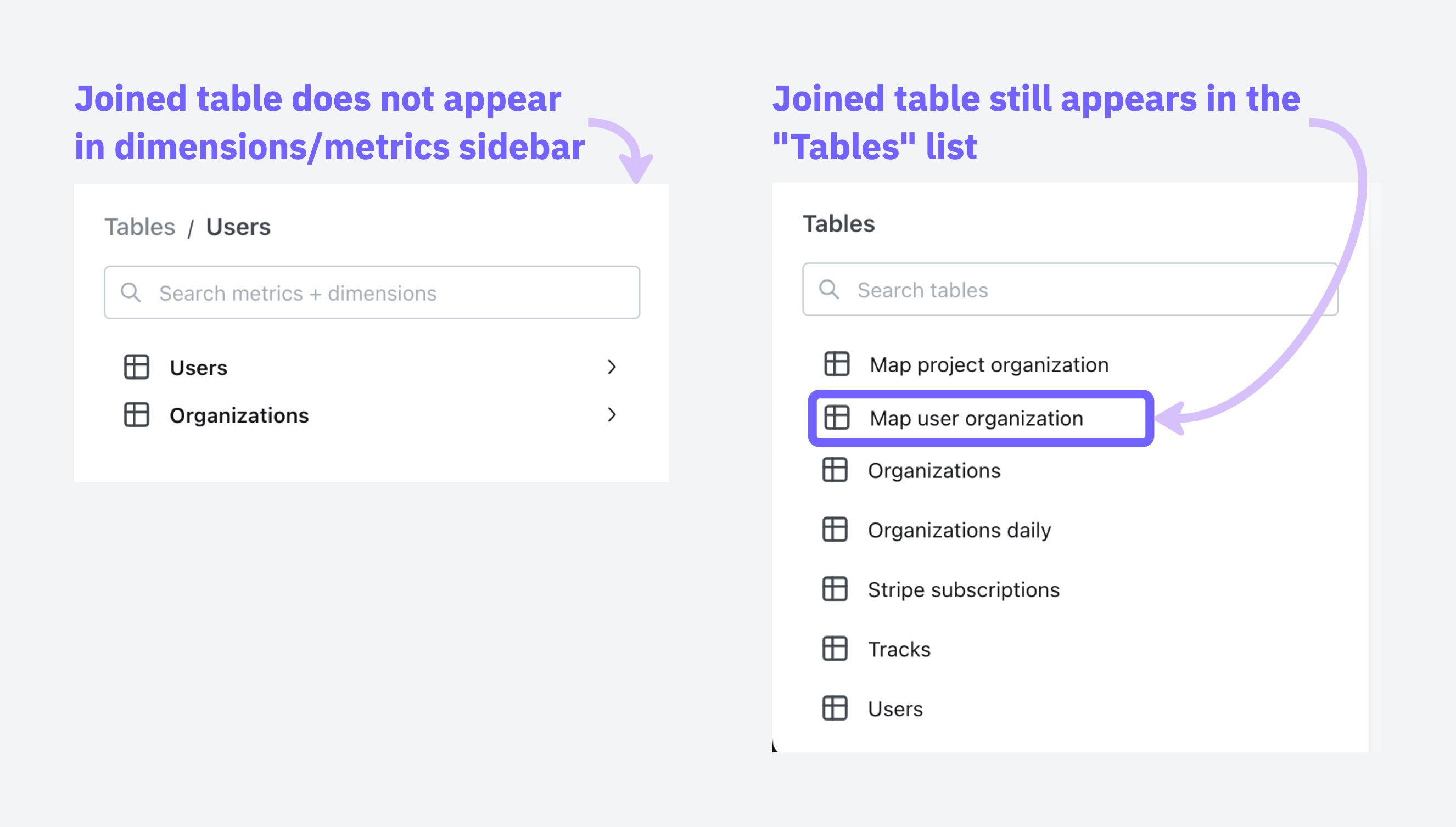
You can adjust which tables show up in the Tables list with Tables configuration in your project settings.
SQL fanouts
When joining tables in SQL, it can accidentally inflate your metrics if those tables have one-to-many relationships. Understanding when this happens helps you know which metrics need special handling.
When dealing with joins that might cause metric inflation, certain types of calculations remain safe to use.
Safe vs. risky metrics
These metrics stay accurate even when the data contains duplicates:
- min and max:
min(order_total)andmax(order_total)give you the same answer whether you have duplicates or not, because they're looking for the extreme values, not counting or adding things up. The maximum value in a set doesn't change just because that value appears multiple times. Aggregate functions with distinct:count(distinct user_id)ensures each user is counted only once, regardless of how many times they appear in the joined result.
These metrics can give you the wrong answers:
sum,count,avgwithout using distinct- Custom calculations that treat duplicated rows as separate data points
Common scenarios and what gets affected
Handling fanouts
Qyra can automatically handle deduplicating metrics that are inflated due to fanouts if join relationships are specified in YAML as described in Defining join relationships, above.
For example:
models:
  - name: users
    config:
      meta:
        primary_key: user_id
        joins:
          - join: organizations
            sql_on: ${organizations.organization_id} = ${users.organization_id}
            relationship: many-to-one
          - join: orders
            sql_on: ${users.user_id} = ${orders.user_id}
relationship: one-to-manymodels:
- name: users
meta:
primary_key: user_id
joins:
- join: organizations
sql_on: ${organizations.organization_id} = ${users.organization_id}
relationship: many-to-one
- join: orders
sql_on: ${users.user_id} = ${orders.user_id}
relationship: one-to-manytype: model
name: users
primary_key: user_id
joins:
- join: organizations
sql_on: ${organizations.organization_id} = ${users.organization_id}
relationship: many-to-one
- join: orders
sql_on: ${users.user_id} = ${orders.user_id}
relationship: one-to-manySpecifying a primary_key and the join relationship allows Qyra to:
- Understand the intended row-level granularity
- Prevent metric inflation by deduplicating joined rows
Once you've included primary keys and a join relationship, Qyra will add CTEs to the compiled SQL query that ensure metrics are not inflated.
How Qyra solves SQL fanouts
Qyra uses a pattern of Common Table Expressions (CTEs) to solve the fanout problem. Here's how it works:
- cte_keys: Contains dimensions (like payment_method, order_id) that define the grain of your final results and the primary keys. Any field you want to GROUP BY in your final output should be included here.
- cte_metrics: Performs calculations on metrics while maintaining the correct grain established by the keys CTE. This prevents double-counting when aggregating across related tables.
- cte_unaffected: Calculates all metrics that are not affected by fanouts. This includes metrics that exclude duplicates by definition (i.e.
MIN(),MAX()andCOUNT(DISTINCT)) as well as metrics that are calculated on the table that is on themanyside of anone-to-manyormany-to-onejoin relationship. For example, if you have joinedaccountstodealsusing aone-to-manyjoin relationship,SUM(deals.amount)would be calculated in this unaffected_cte because thedealsdata is not susceptible to fanouts. - final: Join the metrics CTEs together to create the complete result set.
Qyra creates a separate cte_keys and cte_metrics for each table that contains metrics with fanouts. This is why you'll see names like "cte_keys_orders" and "cte_metrics_orders" in the example below, indicating they're specific to the orders table.
Examples
# Step 1: Create cte_keys that determine the final grain of your results i.e. whatever we will group by.
# Exclude fields that we use in aggregations to calculate metrics e.g. `"orders".amount`
WITH cte_keys_orders AS (
    SELECT DISTINCT
      "orders".status AS "orders_status", -- grouping dimension
      "orders".order_id AS "pk_order_id"  -- primary key
    FROM "postgres"."jaffle"."payments" AS "payments"
    LEFT OUTER JOIN "postgres"."jaffle"."orders" AS "orders"
      ON ("orders".order_id) = ("payments".order_id)
),
# Step 2: Calculate metrics that are affected by fanouts
cte_metrics_orders AS (
    SELECT
      cte_keys_orders."orders_status",
      SUM("orders".amount) AS "orders_total_order_amount" -- order metric (affected by fanout)
    FROM cte_keys_orders
    LEFT JOIN "postgres"."jaffle"."orders" AS "orders" ON cte_keys_orders."pk_order_id" = "orders".order_id -- join with primary keys
    GROUP BY 1 -- Note orders_status are grouping dimensions
),
# Step 3: Calculate metrics that are not affected by fanouts
cte_unaffected AS (
    SELECT
      "orders".status AS "orders_status",
      COUNT(DISTINCT "payments".payment_id) AS "payments_unique_payment_count" -- payment metric (NOT affected by fanout)
    FROM "postgres"."jaffle"."payments" AS "payments"
    LEFT OUTER JOIN "postgres"."jaffle"."orders" AS "orders"
      ON ("orders".order_id) = ("payments".order_id)
    GROUP BY 1 -- Note orders_status are grouping dimensions
)
# Step 4: Join the metrics CTEs together to create the final result with properly calculated metrics
SELECT
  cte_unaffected.*,
  cte_metrics_orders."orders_total_order_amount" AS "orders_total_order_amount"
FROM cte_unaffected
INNER JOIN cte_metrics_orders ON (
  cte_unaffected."orders_status" = cte_metrics_orders."orders_status" OR ( cte_unaffected."orders_status" IS NULL AND cte_metrics_orders."orders_status" IS NULL )
)
ORDER BY "orders_total_order_amount" DESC
LIMIT 500Known limitations
There are a few situations where Qyra doesn't currently handle inflated metrics: