Embedding with React SDK
Components, props, and hooks for embedding Qyra content in a React or Next.js app
Try it and see the code. embed.qyraflow.com is an interactive demo and helper that lets you preview embedded content and generate a JWT for your own project. For a working end-to-end example, see the example embed app on GitHub — a Node.js app that mints tokens server-side and renders a Qyra dashboard.
Overview
The Qyra React SDK (@qyra/sdk) provides React components for embedding Qyra content in your React or Next.js applications. The SDK offers advantages over iframe embedding:
- Seamless integration with your React application
- Programmatic filters for dashboards
- Callbacks for user interactions (e.g., explore navigation)
- Custom styling to match your application
- TypeScript support with full type definitions
For iframe embedding, see the embedding reference.
Set up CORS
To use the React SDK, you need to update your "Cross-Origin Resource Sharing" (CORS) policy so the domain hosting your React app is allowed to call the Qyra API.
In Qyra, go to Project settings -> Embed configuration -> CORS and add each origin where you'll use the SDK.
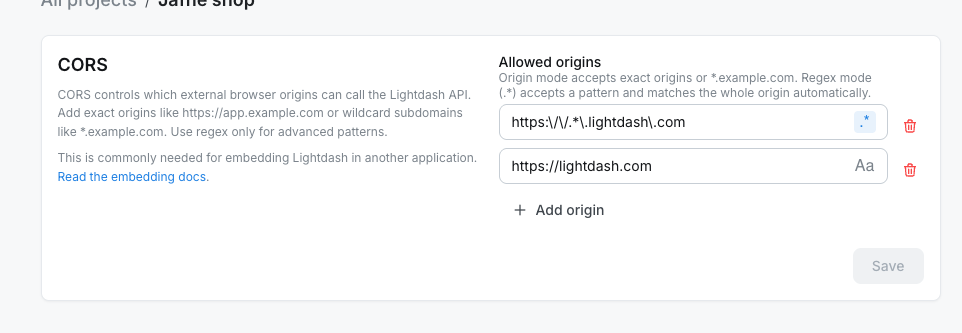
Use origin mode for exact origins and simple subdomain wildcards:
https://app.example.comallows only that exact origin.*.example.comallows HTTPS subdomains likehttps://app.example.comand is saved as a regex pattern.
Use regex mode (.*) for advanced patterns. Enter the pattern body only; Qyra matches the whole origin automatically. For example, https:\\/\\/.*\\.example\\.com allows subdomains of example.com.
Only add origins you control. Avoid broad patterns that could match arbitrary external domains.
For self-hosted deployments, you can also configure instance-level allowed origins with environment variables:
QYRA_CORS_ALLOWED_DOMAINS=https://domain-where-you-are-going-to-use-the-sdk.comCORS is enabled by default. Set QYRA_CORS_ENABLED=false only if you want to disable CORS for the whole instance.
Browsers enforce a Same-Origin Policy that blocks a web application from making requests to a domain other than the one that served it. Because the React SDK calls the Qyra API from your frontend, your instance has to name your application's origin in its CORS configuration for those requests to go through.
CORS is only required for the React SDK. iframe embedding does not require CORS configuration.
Installing the Qyra SDK
In your frontend project, use your preferred package manager to install the SDK.
npm install @qyra/sdk
# or
pnpm add @qyra/sdk
# or
yarn add @qyra/sdk
At the moment, we support React 18 and 19, so make sure your frontend is using React 18 or later. For Next.js, version 15 or later is required.
Import CSS styles
The Qyra SDK requires CSS styles to render components correctly. Import the SDK's CSS file as the first import in your React application's entry point:
import "@qyra/sdk/sdk.css";

import React from "react";
import ReactDOM from "react-dom/client";
import App from "./App";

ReactDOM.createRoot(document.getElementById("root")!).render(
  <React.StrictMode>
    <App />
  </React.StrictMode>
);The CSS import must be the first import in your entry file to ensure Qyra styles load before other styles and avoid conflicts.
Components and hooks
The Qyra SDK exports components for embedding Qyra content and hooks for building custom host-app UI around embedded content:
Qyra.Dashboard- Embed complete dashboards with multiple tilesQyra.DashboardBuilder- Let embedded users create a brand-new dashboardQyra.Chart- Embed individual saved chartsQyra.Explore- Embed interactive data exploration interfaceQyra.AiAgent- Embed an AI agent so users can chat with their dataQyra.MetricsCatalog- Embed the project metrics catalog so users can browse and explore metricsQyra.useQyraContent- List spaces, dashboards, charts, and data apps for a custom content catalogQyra.useQyraAiAgentThreads- List an embed user's previous AI agent threads to build a thread history UI
All components share common props for authentication and styling.
Qyra.Dashboard
Embed complete Qyra dashboards with multiple visualizations, filters, and interactive features. See Embedding dashboards for the JWT claims that control what viewers can do.
Props
type DashboardProps = {
  // Required
  instanceUrl: string;              // Your Qyra instance URL
  token: string | Promise<string>;  // JWT (can be async)

  // Optional
  theme?: 'light' | 'dark';         // Force light or dark color scheme
  styles?: {
    backgroundColor?: string;       // Background color or 'transparent'
    fontFamily?: string;            // Font family for all text
  };
  filters?: SdkFilter[];            // Apply filters programmatically
  paletteUuid?: string;             // Color palette UUID for custom theming
  contentOverrides?: LanguageMap;   // Translate your content (names, titles, markdown)
  uiOverrides?: SdkUiOverrides;     // Translate Qyra UI strings (filters, menus, buttons)
  isEditMode?: boolean;             // Render the dashboard in edit mode (requires writeActions JWT)
  onEditModeChange?: (
    isEditMode: boolean,
  ) => void;                        // Callback when the embed enters or leaves edit mode
  onExplore?: (options: {
    chart: SavedChart
  }) => void;                       // Callback when user navigates to explore
};Basic usage
import Qyra from '@qyra/sdk';

function MyDashboard() {
  return (
    <Qyra.Dashboard
      instanceUrl="https://app.qyraflow.com"
      token={generateToken()} // Server-side function
    />
  );
}
With filters
Apply filters programmatically using the filters prop:
import Qyra, { FilterOperator } from '@qyra/sdk';

<Qyra.Dashboard
  instanceUrl="https://app.qyraflow.com"
  token={token}
  filters={[
    {
      model: 'orders',
      field: 'status',
      operator: FilterOperator.EQUALS,
      value: 'completed',
    },
    {
      model: 'orders',
      field: 'created_date',
      operator: FilterOperator.IN_BETWEEN,
      value: ['2024-01-01', '2024-12-31'],
    },
  ]}
/>
See Filtering data for complete filter documentation.
With styling
<Qyra.Dashboard
  instanceUrl="https://app.qyraflow.com"
  token={token}
  styles={{
    backgroundColor: '#f5f5f5',
    fontFamily: 'Inter, sans-serif',
  }}
/>
With explore callback
Track when users navigate to explore:
<Qyra.Dashboard
  instanceUrl="https://app.qyraflow.com"
  token={generateToken({ canExplore: true })}
  onExplore={({ chart }) => {
    console.log('User exploring chart:', chart.name);
    // Track analytics, show help guides, etc.
  }}
/>
With edit mode
When the JWT includes a writeActions claim, you can render an existing dashboard in edit mode and let users rename it, add saved charts from the allowed space, move or resize tiles, and save changes. The host app controls the edit-mode state through isEditMode and onEditModeChange.
import Qyra from '@qyra/sdk';
import { useState } from 'react';

function EditableDashboard() {
  const [isEditMode, setIsEditMode] = useState(false);

  return (
    <>
      {!isEditMode && (
        <button onClick={() => setIsEditMode(true)}>Edit dashboard</button>
      )}
      <Qyra.Dashboard
        instanceUrl="https://app.qyraflow.com"
        token={generateToken()} // JWT must include writeActions
        isEditMode={isEditMode}
        onEditModeChange={setIsEditMode}
      />
    </>
  );
}Add-tile content is filtered to the JWT writeActions.spaceUuid, so users can only pick saved charts from the allowed space. See Write actions for the JWT claim.
Qyra.DashboardBuilder
Let embedded users build a brand-new dashboard from scratch. On mount, the SDK creates an empty dashboard in the JWT writeActions.spaceUuid and renders it through the same embedded dashboard component as Qyra.Dashboard. The host app controls when the dashboard is in edit mode.
Use this when you want your customers to author their own dashboards inside your app — for example, a "Create dashboard" page in your customer portal — without giving them a Qyra login.
Props
type DashboardBuilderProps = {
  // Required
  instanceUrl: string;              // Your Qyra instance URL
  token: string | Promise<string>;  // JWT with writeActions claim

  // Optional
  theme?: 'light' | 'dark';
  styles?: {
    backgroundColor?: string;
    fontFamily?: string;
  };
  filters?: SdkFilter[];
  paletteUuid?: string;
  contentOverrides?: LanguageMap;
  uiOverrides?: SdkUiOverrides;
  isEditMode?: boolean;             // Render the new dashboard in edit mode
  onEditModeChange?: (
    isEditMode: boolean,
  ) => void;                        // Callback when the embed enters or leaves edit mode
  onDashboardReady?: (
    dashboard: EmbedDashboard,
  ) => void;                        // Called once the empty dashboard has been created
  onExplore?: (options: {
    chart: SavedChart
  }) => void;
};Basic usage
import Qyra from '@qyra/sdk';
import { useEffect, useState } from 'react';

function MyDashboardBuilder() {
  const [isEditMode, setIsEditMode] = useState(false);
  const [isReady, setIsReady] = useState(false);

  return (
    <>
      {isReady && !isEditMode && (
        <button onClick={() => setIsEditMode(true)}>Edit dashboard</button>
      )}
      <Qyra.DashboardBuilder
        instanceUrl="https://app.qyraflow.com"
        token={generateToken()} // JWT must include writeActions
        isEditMode={isEditMode}
        onEditModeChange={setIsEditMode}
        onDashboardReady={() => setIsReady(true)}
      />
    </>
  );
}Requirements and behavior
- The JWT must include a
writeActionsclaim withspaceUuid. JWTs withoutwriteActionsfail closed for write-capable paths. - The new dashboard is created in
writeActions.spaceUuid, named "Untitled dashboard", and is empty. - Add-tile content (saved charts and SQL charts) is filtered to the same space.
- Dashboards created or edited through the SDK are normal Qyra dashboards — they can be viewed and edited from Qyra and vice versa.
- See Write actions for the JWT claim and how to configure the actor and destination space.
Qyra.Chart
Embed individual saved charts for focused, single-metric displays with minimal UI.
Props
type ChartProps = {
  // Required
  instanceUrl: string;              // Your Qyra instance URL
  id: string;                       // Chart UUID (savedQueryUuid)
  token: string | Promise<string>;  // JWT with type: 'chart'

  // Optional
  theme?: 'light' | 'dark';         // Force light or dark color scheme
  styles?: {
    backgroundColor?: string;       // Background color or 'transparent'
    fontFamily?: string;            // Font family for all text
  };
  contentOverrides?: LanguageMap;   // Translate your content (names, titles, markdown)
  uiOverrides?: SdkUiOverrides;     // Translate Qyra UI strings (filters, menus, buttons)
};Unlike Dashboard, Chart does not support filters or onExplore props since charts are read-only and cannot navigate to explore.
Basic usage
import Qyra from '@qyra/sdk';

function MyChart() {
  return (
    <Qyra.Chart
      instanceUrl="https://app.qyraflow.com"
      id="your-chart-uuid"
      token={generateChartToken()} // Server-side function
    />
  );
}With styling
<Qyra.Chart
  instanceUrl="https://app.qyraflow.com"
  id="your-chart-uuid"
  token={token}
  styles={{
    backgroundColor: 'white',
    fontFamily: 'Helvetica, Arial, sans-serif',
  }}
/>
Token generation for charts
Charts require a JWT with type: 'chart':
// Backend API endpoint
import jwt from 'jsonwebtoken';

export function generateChartToken(chartId) {
  return jwt.sign({
    content: {
      type: 'chart',
      contentId: chartId,  // savedQueryUuid
      canExportCsv: true,
      canExportImages: false,
      canViewUnderlyingData: true,
    },
  }, process.env.QYRA_EMBED_SECRET, { expiresIn: '24h' });
}
See Embedding charts guide for details.
Qyra.Explore
Embed interactive data exploration interface with full query builder capabilities.
Props
type ExploreProps = {
  // Required
  instanceUrl: string;              // Your Qyra instance URL
  token: string | Promise<string>;  // JWT with canExplore: true

  // Optional
  theme?: 'light' | 'dark';         // Force light or dark color scheme
  styles?: {
    backgroundColor?: string;       // Background color or 'transparent'
    fontFamily?: string;            // Font family for all text
  };
  contentOverrides?: LanguageMap;   // Translate your content (names, titles, markdown)
  uiOverrides?: SdkUiOverrides;     // Translate Qyra UI strings (filters, menus, buttons)
};Basic usage
import Qyra from '@qyra/sdk';

function MyExplore() {
  return (
    <Qyra.Explore
      instanceUrl="https://app.qyraflow.com"
      token={generateExploreToken()} // Must include canExplore: true
    />
  );
}
With styling
<Qyra.Explore
  instanceUrl="https://app.qyraflow.com"
  token={token}
  styles={{
    backgroundColor: '#f9f9f9',
    fontFamily: 'Inter, sans-serif',
  }}
/>
Token generation for explores
Explores require canExplore: true in the JWT:
// Backend API endpoint
import jwt from 'jsonwebtoken';

export function generateExploreToken() {
  return jwt.sign({
    content: {
      type: 'dashboard',  // Can use dashboard type
      dashboardUuid: 'starting-dashboard-uuid',
      canExplore: true,   // Required for explore access
      canExportCsv: true,
      canExportImages: true,
    },
  }, process.env.QYRA_EMBED_SECRET, { expiresIn: '4h' });
}Qyra.AiAgent
Embed a Qyra AI agent so embedded users can chat with their data, generate charts, and save results back to a fixed space — without a Qyra login.
The component renders the agent inside an iframe. Use threadUuid to deep-link into an existing thread, or omit it to land on the new-thread screen.
Props
type AiAgentProps = {
  // Required
  instanceUrl: string;              // Your Qyra instance URL
  agentUuid: string;                // Agent to embed (must match the JWT)
  token: string | Promise<string>;  // JWT with content.type: 'aiAgent'

  // Optional
  threadUuid?: string;              // Open a specific thread on load
  onThreadChange?: (options: { threadUuid: string }) => void; // Fires when the embed opens or creates a thread
  theme?: 'light' | 'dark';
  styles?: {
    backgroundColor?: string;
  };
};Qyra.AiAgent does not accept filters, contentOverrides, uiOverrides, or onExplore. Threads, navigation, and chart actions are managed inside the embedded agent UI.
onThreadChange fires whenever the embedded agent creates a new thread or opens an existing one. Use it together with threadUuid to persist the current conversation in your app (for example in localStorage or your own backend) and resume it the next time the user returns. Under the hood, the SDK passes a targetOrigin query parameter to the iframe and listens for qyra:aiAgentThreadChanged postMessage events from the embedded page — no extra setup is required on your side.
Basic usage
import Qyra from '@qyra/sdk';

function MyAiAgent() {
  return (
    <Qyra.AiAgent
      instanceUrl="https://app.qyraflow.com"
      agentUuid="your-agent-uuid"
      token={generateAiAgentToken()} // Server-side function
    />
  );
}Open a specific thread
Pass threadUuid to deep-link the embed into a specific conversation on mount:
<Qyra.AiAgent
  instanceUrl="https://app.qyraflow.com"
  agentUuid="your-agent-uuid"
  threadUuid="thread-uuid"
  token={token}
/>
Persist and resume the last conversation
Combine threadUuid and onThreadChange to keep users on their most recent thread across page reloads. This example stores the latest thread UUID in localStorage:
import Qyra from '@qyra/sdk';
import { useState } from 'react';

const STORAGE_KEY = 'acme-shop:qyra-ai-thread';

function ShopInsightsAgent({ token }: { token: string }) {
  const [threadUuid, setThreadUuid] = useState<string | undefined>(
    () => localStorage.getItem(STORAGE_KEY) ?? undefined,
  );

  return (
    <Qyra.AiAgent
      instanceUrl="https://app.qyraflow.com"
      agentUuid="agent-shop-insights"
      token={token}
      threadUuid={threadUuid}
      onThreadChange={({ threadUuid: nextThreadUuid }) => {
        setThreadUuid(nextThreadUuid);
        localStorage.setItem(STORAGE_KEY, nextThreadUuid);
      }}
    />
  );
}Token generation for AI agents
AI agent embeds require a JWT with content.type: 'aiAgent' and a writeActions claim that pins the destination space and the actor used for agent queries and chart saves:
// Backend API endpoint
import jwt from 'jsonwebtoken';

export function generateAiAgentToken() {
  return jwt.sign({
    content: {
      type: 'aiAgent',
      projectUuid: 'your-project-uuid',
      agentUuid: 'your-agent-uuid',
    },
    writeActions: {
      serviceAccountUserUuid: 'service-account-user-uuid',
      spaceUuid: 'destination-space-uuid',
    },
    userAttributes: {
      tenant_id: 'tenant-abc',
    },
  }, process.env.QYRA_EMBED_SECRET, { expiresIn: '1h' });
}
See Embedding AI agents for the full guide and AI agent token for the complete JWT structure.
Qyra.MetricsCatalog
Embed the Qyra metrics catalog so embedded users can browse the metrics defined in a project, preview them, and — when the JWT allows it — continue into Explore without leaving your app.
The component renders the catalog inside an iframe. When a viewer clicks Explore from here on a metric, the SDK swaps in an embedded Explore view; a Back action returns them to the catalog.
Props
type MetricsCatalogProps = {
  // Required
  instanceUrl: string;              // Your Qyra instance URL
  token: string | Promise<string>;  // JWT with content.type: 'metricsCatalog'

  // Optional
  theme?: 'light' | 'dark';         // Force light or dark color scheme
  styles?: {
    backgroundColor?: string;       // Background color or 'transparent'
    fontFamily?: string;            // Font family for all text
  };
};Qyra.MetricsCatalog does not accept filters, contentOverrides, uiOverrides, or onExplore. The catalog and the embedded Explore it launches are managed inside the component.
Basic usage
import Qyra from '@qyra/sdk';

function MyMetricsCatalog() {
  return (
    <Qyra.MetricsCatalog
      instanceUrl="https://app.qyraflow.com"
      token={generateMetricsCatalogToken()} // Server-side function
    />
  );
}
Token generation for the metrics catalog
Metrics catalog embeds require a JWT with content.type: 'metricsCatalog' and a projectUuid. Set content.canExplore to true to let embedded users open Explore from a metric, and include a writeActions claim if you want them to save the resulting charts back to Qyra.
// Backend API endpoint
import jwt from 'jsonwebtoken';

export function generateMetricsCatalogToken() {
  return jwt.sign({
    content: {
      type: 'metricsCatalog',
      projectUuid: 'your-project-uuid',
      canExplore: true,
    },
    writeActions: {
      serviceAccountUserUuid: 'service-account-user-uuid',
      spaceUuid: 'destination-space-uuid',
    },
    userAttributes: {
      tenant_id: 'tenant-abc',
    },
  }, process.env.QYRA_EMBED_SECRET, { expiresIn: '1h' });
}Omit canExplore (or set it to false) to publish a read-only browse experience. See Embedding the metrics catalog for the full guide and Metrics catalog token for the complete JWT structure.
API hooks
Qyra.useQyraContent
Use useQyraContent when you want your own app to list Qyra content instead of embedding the Qyra home page. A common pattern is to let customers choose a space in your UI, show the dashboards and charts in that space, then render the selected object with Qyra.Dashboard or Qyra.Chart.
The hook calls the Qyra content API and returns metadata only. It does not render the selected chart or dashboard, and it does not replace the chart or dashboard embed token you pass to the render component.
Backend: generate an API access token
Generate the token on your backend with your Qyra embed secret. Never expose the embed secret in browser code.
import jwt from 'jsonwebtoken';

export function generateContentCatalogToken() {
  return jwt.sign(
    {
      content: {
        type: 'apiAccess',
        projectUuid: 'your-project-uuid',
        serviceAccountUserUuid: 'service-account-user-uuid',
      },
      user: {
        externalId: 'customer-user-123',
        email: 'customer@example.com',
      },
      userAttributes: {
        tenant_id: 'tenant-abc',
      },
    },
    process.env.QYRA_EMBED_SECRET,
    { expiresIn: '1h' },
  );
}The service account controls what the hook can list. If the service account cannot view a private space, content from that space is not returned.
Frontend: list content in a space
import Qyra from '@qyra/sdk';

function ContentCatalog({
  instanceUrl,
  projectUuid,
  token,
  spaceUuid,
}: {
  instanceUrl: string;
  projectUuid: string;
  token: string;
  spaceUuid: string;
}) {
  const { data, error, isLoading, refetch } = Qyra.useQyraContent(
    {
      instanceUrl,
      projectUuid,
      auth: {
        type: 'embedToken',
        token,
      },
    },
    {
      spaceUuids: [spaceUuid],
      contentTypes: ['dashboard', 'chart'],
      page: 1,
      pageSize: 50,
      sortBy: 'name',
      sortDirection: 'asc',
    },
  );

  if (isLoading) return <p>Loading content...</p>;
  if (error) return <p>Unable to load content</p>;

  return (
    <div>
      <button type="button" onClick={() => refetch()}>
        Refresh
      </button>

      {data?.data.map((item) => (
        <button key={item.uuid} type="button">
          {item.name}
        </button>
      ))}
    </div>
  );
}Options
type ListContentOptions = {
  projectUuids?: string[];
  spaceUuids?: string[];
  parentSpaceUuid?: string;
  contentTypes?: Array<'space' | 'dashboard' | 'chart' | 'data_app'>;
  page?: number;
  pageSize?: number;
  search?: string;
  sortBy?: 'name' | 'space_name' | 'last_updated_at';
  sortDirection?: 'asc' | 'desc';
};Use the spaceUuids option as a filter, not as an authorization boundary — authorization comes from the API access token's service account permissions. apiAccess tokens are for API reads such as content listing; to let embedded users save charts or dashboards, use an embed token that supports writeActions.
Qyra.useQyraAiAgentThreads
Use useQyraAiAgentThreads when you want to show your users a list of their previous AI agent conversations — for example a "Recent chats" sidebar next to a Qyra.AiAgent embed. The hook calls the AI agent threads endpoint with the embed JWT, so it returns only threads that belong to the JWT-authenticated embed user and are scoped to their embed space.
Pair it with Qyra.AiAgent's threadUuid and onThreadChange props to let users resume any past conversation.
Options
type ListAiAgentThreadsOptions = {
  agentUuid: string;      // The agent whose threads should be listed
  projectUuid?: string;   // Falls back to the projectUuid on QyraApiClientConfig
};
The hook takes the same QyraApiClientConfig as useQyraContent, with auth.type: 'embedToken' and the AI agent embed JWT as the token.
Types
type QyraAiAgentThreadResults = QyraAiAgentThread[];

// One entry per thread the embed user can see. Full shape lives in
// @qyra/common's ApiAiAgentThreadSummaryListResponse; the useful fields
// for building thread history UIs are:
type QyraAiAgentThread = {
  uuid: string;
  title?: string;
  firstMessage: { message: string };
  // ...additional metadata such as timestamps
};Example: thread history + resume
import Qyra, {
  useQyraAiAgentThreads,
  type QyraApiClientConfig,
} from '@qyra/sdk';
import { useState } from 'react';

const STORAGE_KEY = 'acme-shop:qyra-ai-thread';

function ShopInsightsAgentWithHistory({
  token,
  projectUuid,
  agentUuid,
}: {
  token: string;
  projectUuid: string;
  agentUuid: string;
}) {
  const apiConfig: QyraApiClientConfig = {
    instanceUrl: 'https://app.qyraflow.com',
    projectUuid,
    auth: { type: 'embedToken', token },
  };

  const threads = Qyra.useQyraAiAgentThreads(apiConfig, {
    agentUuid,
    projectUuid,
  });

  const [threadUuid, setThreadUuid] = useState<string | undefined>(
    () => localStorage.getItem(STORAGE_KEY) ?? undefined,
  );

  return (
    <div style={{ display: 'grid', gridTemplateColumns: '280px 1fr' }}>
      <aside>
        <button type="button" onClick={() => setThreadUuid(undefined)}>
          New thread
        </button>

        {threads.isLoading && <p>Loading history…</p>}
        {threads.data?.map((thread) => (
          <button
            key={thread.uuid}
            type="button"
            onClick={() => setThreadUuid(thread.uuid)}
          >
            {thread.title ?? thread.firstMessage.message}
          </button>
        ))}
      </aside>

      <Qyra.AiAgent
        instanceUrl="https://app.qyraflow.com"
        token={token}
        agentUuid={agentUuid}
        threadUuid={threadUuid}
        onThreadChange={({ threadUuid: nextThreadUuid }) => {
          setThreadUuid(nextThreadUuid);
          localStorage.setItem(STORAGE_KEY, nextThreadUuid);
          // Refresh the sidebar so new threads show up immediately.
          threads.refetch();
        }}
      />
    </div>
  );
}useQyraAiAgentThreads uses the same embed JWT you pass to Qyra.AiAgent. The token's content.agentUuid and writeActions.spaceUuid are what scope the returned threads — the hook cannot list threads from a different agent or space, even if you pass a different agentUuid argument.
Generating embed tokens
All SDK components require JWTs generated server-side, signed with the embed secret from embed setup. Here's a complete example, including user attributes for row-level filtering:
Backend API endpoint
// server/api/embed-token.ts
import jwt from 'jsonwebtoken';

export async function generateEmbedToken(req, res) {
  // Authenticate user
  const userId = req.user.id;
  const user = await getUserFromDatabase(userId);

  // Generate token with user-specific attributes
  const token = jwt.sign({
    content: {
      type: 'dashboard',
      dashboardUuid: 'your-dashboard-uuid',
      dashboardFiltersInteractivity: {
        enabled: 'all',
      },
      canExportCsv: true,
      canExplore: true,
    },
    userAttributes: {
      tenant_id: user.tenantId,  // Row-level filtering
    },
    user: {
      externalId: user.id,
      email: user.email,
    },
  }, process.env.QYRA_EMBED_SECRET, { expiresIn: '1h' });

  res.json({ token });
}Frontend React component
import Qyra from '@qyra/sdk';
import { useState, useEffect } from 'react';

function EmbeddedDashboard() {
  const [token, setToken] = useState<string | null>(null);

  useEffect(() => {
    // Fetch token from your backend
    fetch('/api/embed-token')
      .then(res => res.json())
      .then(data => setToken(data.token));
  }, []);

  if (!token) return <div>Loading...</div>;

  return (
    <Qyra.Dashboard
      instanceUrl="https://app.qyraflow.com"
      token={token}
    />
  );
}To ensure security, JWT generation code must run in your backend, and the Qyra embed secret must never be exposed in frontend code. This prevents unauthorized access and protects sensitive data.
Applying styles
Override styles within Qyra components to match your application's design.
Supported style overrides
styles?: {
  fontFamily?: string;       // Sets all fonts within the component
  backgroundColor?: string;  // Sets the background color or 'transparent'
}
Both properties accept normal CSS values and are set on a styles object passed to any component.
Font family
Sets the font family for all text within the embedded content. Font sizes and other properties are preserved.
<Qyra.Dashboard
  instanceUrl={qyraUrl}
  token={qyraToken}
  styles={{
    fontFamily: 'Inter, sans-serif',
  }}
/>
Some charts and components set font-family explicitly, so the fontFamily style is applied with higher specificity to override these.
Background color
Sets the background for the embedded content. Can be any color value or 'transparent'.
<Qyra.Dashboard
  instanceUrl={qyraUrl}
  token={qyraToken}
  styles={{
    backgroundColor: 'transparent',
  }}
/>
Complete example
<Qyra.Dashboard
  instanceUrl={qyraUrl}
  token={qyraToken}
  styles={{
    backgroundColor: '#f5f5f5',
    fontFamily: 'Helvetica, Arial, sans-serif',
  }}
/>CSS class overrides
Beyond the styles prop, you can target embedded dashboard elements directly from your application's stylesheet. Each element below carries a stable, human-readable classname that is part of the SDK's public API — it won't change when internal layout does, so your overrides stay resilient across releases.
| Class | Element |
|---|---|
ld-dashboard-header | The dashboard header bar |
ld-dashboard-filters | The filter bar row |
ld-dashboard-filter | An individual filter pill |
ld-dashboard-date-zoom | The date-zoom control(s) |
ld-dashboard-parameters | The parameters row |
ld-dashboard-parameter | An individual parameter pill |
ld-dashboard-filter-dropdown | An open filter's dropdown |
ld-dashboard-date-zoom-dropdown | The open date-zoom menu |
ld-dashboard-parameter-dropdown | An open parameter's dropdown |
ld-dashboard-guided-setup | The guided setup card shown while required filters or requirement groups are unmet |
.ld-dashboard-filters {
  gap: 1rem;
}

.ld-dashboard-filter-dropdown {
  font-size: 1rem;
  min-width: 380px;
}The filter, date-zoom, and parameter dropdowns render in a portal at the page root — outside the dashboard container — so target them with a global selector rather than as a descendant of the embedded dashboard.
Light and dark mode
Use the theme prop to render embedded content in either 'light' or 'dark' mode. This is typically driven by the host application's own theme state, so the embedded dashboard, chart, or explore matches the surrounding UI.
<Qyra.Dashboard
  instanceUrl={qyraUrl}
  token={qyraToken}
  theme="dark"
/>
The theme prop is supported on Qyra.Dashboard, Qyra.Chart, and Qyra.Explore.
When theme is set, the SDK forces the Mantine color scheme and ignores any user-toggled preference stored in the embed. Omit the prop to let the embed use its default (light) color scheme.
Syncing with your app's theme
Pass your app's current theme value directly to the SDK so the embed re-renders when it changes:
import Qyra from '@qyra/sdk';
import { useState } from 'react';

function EmbeddedDashboard() {
  const [theme, setTheme] = useState<'light' | 'dark'>('light');

  return (
    <Qyra.Dashboard
      instanceUrl={qyraUrl}
      token={qyraToken}
      theme={theme}
    />
  );
}Combining with styles.backgroundColor
When theme is set, the embed uses the matching Mantine body background by default. If you also pass styles.backgroundColor, your value takes precedence:
<Qyra.Dashboard
  instanceUrl={qyraUrl}
  token={qyraToken}
  theme="dark"
  styles={{
    backgroundColor: '#0b0b0f', // Overrides the default dark background
  }}
/>
Color palettes
You can customize the appearance of embedded dashboards using color palettes. Define multiple color palettes in your organization settings, then apply them to embedded dashboards using the paletteUuid prop.
For more on customizing appearance, see customizing the appearance of your project.
Setting up color palettes
- Go to Organization settings > Appearance in Qyra
- Define one or more color palettes
- Copy the palette UUID for the palette you want to use (or fetch from API
GET /api/v1/org/color-palettes)
Applying a palette
Pass the paletteUuid prop to the Qyra.Dashboard component:
<Qyra.Dashboard
  instanceUrl="https://app.qyraflow.com"
  token={token}
  paletteUuid="your-palette-uuid"
/>
Filtering data
Filters can be passed to <Qyra.Dashboard/> to filter dimensions by values. Filters are applied as AND operations, each further restricting results. The Chart and Explore components do not support the filters prop.
For the filters prop to work, your JWT must have dashboardFiltersInteractivity set to enabled: 'all'. Without this configuration, filters will not be applied.
Filter structure
type SdkFilter = {
  model: string;             // The model the dimension is part of
  field: string;             // The name of the dimension to filter by
  operator: FilterOperator;  // The filter operator (enum)
  value: unknown | unknown[]; // The value(s) to filter against
};
Basic example
<Qyra.Dashboard
  instanceUrl={qyraUrl}
  token={qyraToken}
  filters={[
    {
      model: 'dbt_users',
      field: 'browser',
      operator: FilterOperator.INCLUDE,
      value: ['chrome', 'safari'],
    },
  ]}
/>Multiple filters
Filters are applied as AND operations:
<Qyra.Dashboard
  instanceUrl={qyraUrl}
  token={qyraToken}
  filters={[
    {
      model: 'dbt_users',
      field: 'created_date_week',
      operator: FilterOperator.IN_BETWEEN,
      value: ['2024-08', '2024-10'],
    },
    {
      model: 'dbt_users',
      field: 'browser',
      operator: FilterOperator.INCLUDE,
      value: ['chrome', 'safari'],
    },
    {
      model: 'orders',
      field: 'status',
      operator: FilterOperator.EQUALS,
      value: 'completed',
    },
  ]}
/>FilterOperator enum
Import FilterOperator from the SDK:
import Qyra, { FilterOperator } from '@qyra/sdk';Available operators:
| Operator | Description | Value Type |
|---|---|---|
FilterOperator.IS_NULL | Field is null | n/a |
FilterOperator.NOT_NULL | Field is not null | n/a |
FilterOperator.EQUALS | Field equals value | single value |
FilterOperator.NOT_EQUALS | Field does not equal value | single value |
FilterOperator.STARTS_WITH | Field starts with value | single value |
FilterOperator.ENDS_WITH | Field ends with value | single value |
FilterOperator.INCLUDE | Field includes any of values | array |
FilterOperator.NOT_INCLUDE | Field does not include values | array |
FilterOperator.LESS_THAN | Field is less than value | single value |
FilterOperator.LESS_THAN_OR_EQUAL | Field is ≤ value | single value |
FilterOperator.GREATER_THAN | Field is greater than value | single value |
FilterOperator.GREATER_THAN_OR_EQUAL | Field is ≥ value | single value |
FilterOperator.IN_THE_PAST | Date in the past N units | single value |
FilterOperator.NOT_IN_THE_PAST | Date not in past N units | single value |
FilterOperator.IN_THE_NEXT | Date in the next N units | single value |
FilterOperator.IN_THE_CURRENT | Date in current period | single value |
FilterOperator.NOT_IN_THE_CURRENT | Date not in current period | single value |
FilterOperator.IN_BETWEEN | Field between two values | array with 2 values |
FilterOperator.NOT_IN_BETWEEN | Field not between values | array with 2 values |
Available fields
Only fields that are available for filtering can be filtered. These are specified in the JWT passed to the SDK.
To generate tokens with filterable fields, configure your embed in the Qyra UI or include the appropriate fields in your JWT structure.
Localization
The React SDK has two translation props, split by what they translate:
| Prop | Translates | Shape |
|---|---|---|
contentOverrides | Your content: dashboard and chart names, tile titles, markdown, custom filter labels | LanguageMap, slug-keyed, generated with qyra download --language-map |
uiOverrides | Qyra's UI: filter operators and inputs, the filter popover, date zoom, tile menus, export buttons | Flat { key: string } map with a fixed, typed key set |
There is no locale setting and no bundled language packs. Your app owns locale state and passes the translated strings for the language it wants. Anything you don't override renders in the built-in English.
Both props are accepted by Qyra.Dashboard, Qyra.DashboardBuilder, Qyra.Chart, and Qyra.Explore. They are React SDK props only; iframe embeds are not translatable.
Translating your content with contentOverrides
contentOverrides translates the content you author in Qyra: dashboard names and descriptions, tile titles, chart names, axis labels, series names, markdown content, and the custom labels you've set on dashboard filters.
Recommended tools:
- Translation maps – The Qyra CLI can generate translation maps when downloading content as code
- Runtime translation management – Use a translation library like
i18next - Translation production tools – Tools like Locize help manage translations efficiently
Video overview
Translation maps
The Qyra CLI can produce translation maps for dashboards and charts. To include translation maps when downloading content, add the --language-map flag:
qyra download --language-mapAlongside each downloaded dashboard and chart, there will be a <file name>.language.map.yml file containing translatable strings.
Example translation map:
dashboard:
  sdk-dash:
    name: SDK dashboard demo
    description: "A dashboard demonstrating SDK features"
    filters:
      labels:
        Completed orders: Completed orders
        Order period: Order period
    tiles:
      - type: markdown
        properties:
          title: SDK demo dashboard
          content: >-
            This dashboard contains various tile types for showing SDK
            features.
      - type: saved_chart
        properties:
title: "How do payment methods vary across different amount ranges?"These translation maps can be imported into tools like Locize to begin translation.
Filter labels. If a dashboard has filters with custom labels, the map includes a filters.labels block mapping each source label to its translation. Replace the right-hand values with the translated strings. Entries are keyed by the source label rather than by position, so translations keep working when filters are reordered, added, or removed. Renaming a filter label in Qyra invalidates its entry, and the filter pill falls back to the untranslated label until you regenerate the map. Filters without a custom label show the field name, which isn't translatable.
Translations only change what viewers see. When someone saves an embedded dashboard in edit mode, Qyra keeps the source filter labels, so the saved dashboard is unchanged for other languages.
Runtime translation
At runtime, pass a translation object to the SDK's contentOverrides prop. We suggest using i18Next to load translations:
import i18n from 'i18next';

<Qyra.Dashboard
  instanceUrl={qyraUrl}
  token={qyraToken}
  contentOverrides={i18n.getResourceBundle(
    i18n.language,      // Specify language
    'demo-dashboard',   // Specify namespace
  )}
/>Setting up i18Next with Locize
import i18next from 'i18next';
import { initReactI18next } from 'react-i18next';
import Locize from 'i18next-locize-backend';

i18next
  .use(Locize)  // Add Locize backend
  .use(initReactI18next)  // Bind react-i18next
  .init({
    // Locize configuration
    backend: {
      projectId: 'your-locize-project-id',
      apiKey: 'your-api-key',
      referenceLng: 'en',
    },
    lng: 'en',
    fallbackLng: 'en',
    interpolation: {
      escapeValue: false,
    },
});Translating the Qyra UI with uiOverrides
uiOverrides translates the interface Qyra renders around your content: filter operators and inputs, the add/edit filter popover, the date zoom control, tile menus, and dashboard export buttons.
Pass a flat object mapping keys to translated strings. The key set is exported as the TypeScript type SdkUiOverrides from @qyra/sdk, so editors autocomplete every key and unknown keys are compile errors.
import Qyra, { type SdkUiOverrides } from '@qyra/sdk';

const frenchUi: SdkUiOverrides = {
  'filters.addFilter': 'Ajouter un filtre',
  'filters.apply': 'Appliquer',
  'filters.operators.equals': 'est',
  'filters.operators.inThePast': 'au cours des derniers',
  'filters.unitsOfTime.days.plural': 'jours',
  'filters.unitsOfTime.days.completedPlural': 'jours révolus',
  'dateZoom.defaultZoom': 'Zoom par défaut',
  'tileMenu.downloadData': 'Télécharger les données',
};

<Qyra.Dashboard
  instanceUrl={instanceUrl}
  token={token}
  contentOverrides={frenchLanguageMap} // your content
  uiOverrides={frenchUi}               // Qyra's UI
/>;Both the @qyra/sdk package and your Qyra instance must be on a version that includes uiOverrides. If you self-host, upgrade your instance as well, since the strings render inside Qyra's UI. There is no feature flag; uiOverrides is available wherever embedding is available.
Available keys
Keys are flat dot-paths, namespaced by the surface they translate:
filters.*– operator labels (including date-specific variants), units of time, filter pills, the add/edit filter popover, value inputs, autocomplete states, the collapsed filter-bar summary, cross-filtering menu items, and the required-filters flow viewers seedateZoom.*– the date zoom control, granularity names, tooltips, and the per-tile zoom indicatortileMenu.*– the tile menu: Explore from here, Download data, Export image, View underlying datadashboard.*– dashboard-level export and print buttons
Every key is also exported through the SdkUiOverrides type in @qyra/sdk, so your editor autocompletes the full set. The complete list with the built-in English defaults:
A quick way to create a new translation: copy one of the examples above and ask an AI agent to translate the values into your target language. Keep the keys and any {token} placeholders unchanged, then review the output before shipping it.
Key rules
- Every key is optional. Partial dictionaries are fine; missing keys render in English.
- Keys are a stable, additive contract. Existing keys are never renamed or removed across SDK versions. New UI may add keys, which fall back to English until you translate them.
- Keep
{token}placeholders. Some values contain placeholders that Qyra fills at runtime, like'filters.autocomplete.addValue': 'Add "{value}"'or'filters.crossFilter.menuLabel': 'Filter dashboard on {field} to'. Keep the token, with its exact name in braces, somewhere in the translation. Its position is free. No other syntax is supported (not ICU MessageFormat). - Plurals are one key per form. Count-dependent strings exist as separate keys, like
filters.summary.filterSingular/filters.summary.filterPlural, and units of time with.singular/.plural/.completedSingular/.completedPluralvariants. There are no CLDR plural rules, so languages with more than two plural forms can only approximate.
Using uiOverrides with an i18n framework
Because the map is flat JSON, it drops directly into i18next-style resource files. Keep a uiOverrides object per locale and pass the active one:
// locales/fr/translation.json → { "uiOverrides": { "filters.apply": "Appliquer", ... } }
const uiOverrides = i18n.getResourceBundle(i18n.language, 'translation')?.uiOverrides;

<Qyra.Dashboard ... uiOverrides={uiOverrides} key={i18n.language} />;
Re-mounting the component on language change (the key prop) is the simplest way to re-render every string.
What can be translated
| Surface | Translatable with |
|---|---|
| Dashboard and chart names, descriptions, tile titles, axis labels, series names, markdown content, custom filter labels | contentOverrides |
| Filter operators and inputs, the filter popover, date zoom, tile menus, export and print buttons | uiOverrides |
Not translatable:
- Data from your warehouse – string values in charts, dimension values, and raw table data render as they exist in your database
- Field and table names – dimension and metric names shown in the field picker, and on filter pills without a custom label, come from your dbt schema
- Date picker internals – month and weekday names inside calendar popups render in English
- Data formatting – numbers, dates, and currencies render per chart config
- Editor-only UI – dashboard edit mode is not translated
Complete example
Here's a full example integrating everything:
Backend (Express + Node.js)
// server.js
import express from 'express';
import jwt from 'jsonwebtoken';
import cors from 'cors';

const app = express();
app.use(cors());

app.get('/api/dashboard-token', authenticateUser, async (req, res) => {
  const user = await getUserFromDatabase(req.user.id);

  const token = jwt.sign({
    content: {
      type: 'dashboard',
      dashboardUuid: 'abc-123-def-456',
      dashboardFiltersInteractivity: { enabled: 'all' },
      parameterInteractivity: { enabled: true },
      canExportCsv: true,
      canExportImages: true,
      canExplore: true,
      canViewUnderlyingData: true,
    },
    userAttributes: {
      tenant_id: user.tenantId,
      region: user.region,
    },
    user: {
      externalId: user.id,
      email: user.email,
    },
  }, process.env.QYRA_EMBED_SECRET, { expiresIn: '2h' });

  res.json({ token, projectUuid: process.env.QYRA_PROJECT_UUID });
});

app.listen(3000);Frontend (React)
// Dashboard.tsx
import { useState, useEffect } from 'react';
import Qyra, { FilterOperator } from '@qyra/sdk';

export function EmbeddedDashboard() {
  const [token, setToken] = useState<string | null>(null);
  const [loading, setLoading] = useState(true);

  useEffect(() => {
    fetch('/api/dashboard-token')
      .then(res => res.json())
      .then(data => {
        setToken(data.token);
        setLoading(false);
      })
      .catch(err => {
        console.error('Failed to load token:', err);
        setLoading(false);
      });
  }, []);

  if (loading) return <div>Loading analytics...</div>;
  if (!token) return <div>Failed to load dashboard</div>;

  return (
    <div style={{ height: '100vh', width: '100%' }}>
      <Qyra.Dashboard
        instanceUrl="https://app.qyraflow.com"
        token={token}
        filters={[
          {
            model: 'orders',
            field: 'status',
            operator: FilterOperator.EQUALS,
            value: 'completed',
          },
        ]}
        styles={{
          backgroundColor: 'transparent',
          fontFamily: 'Inter, -apple-system, sans-serif',
        }}
        onExplore={({ chart }) => {
          console.log('User exploring:', chart.name);
          // Track analytics event
        }}
      />
    </div>
  );
}